Critical Edition
Differences in line numbering should present no problems to readers who wish to use Electronic Beowulf 4.1 with another edition, because we have provided searchable cross-references in the Options menu. Simply choose “Traditional” in Options to search by traditional line numbers and to show them as tooltips in the margins.
Thorkelin Restorations
Choosing Critical Edition from the top of the Options menu opens many additional ways to access the manuscript evidence. This button releases the editorial markup that identifies Thorkelin restorations, as well as editorial emendations and conjectural restorations. Readings restored by Thorkelin A are in parentheses, those by Thorkelin B are in square brackets, while editorial emendations and conjectural emendations are in square brackets with italics. For example, the reading gigantas in the critical edition is marked gi[ga](ntas) to show that only B provides evidence for -ga-, but that A or AB attest to -ntas:

Figure 12. Restorations by Thorkelin A and B
A click of the mouse on any reading (in parentheses) supplied by Thorkelin A, by Thorkelin A and B together, or by Thorkelin B [in square brackets], opens the textual notes, many of which are illustrated by backlit or ultraviolet images, to that specific reading.
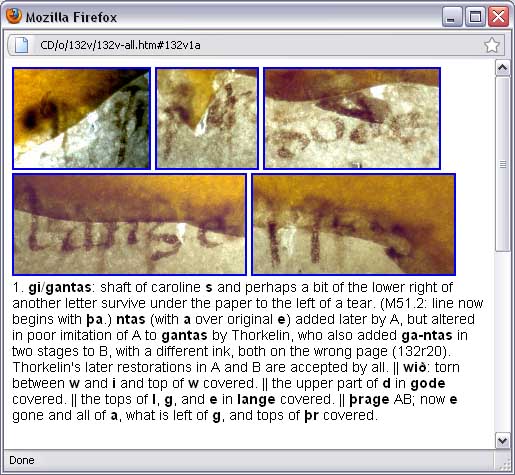
Figure 13. Backlits supporting textual notes
If one clicks on the illustration of any textual note, a larger image of that illustration with its textual note opens in a separate window. The size and resolution of these larger images are often suitable for serious research purposes. To approximate the same result using the manuscript itself, one would need fiber-optics and very powerful magnification, and even then there would be no apparent way to preserve all the results (there are over 1300 backlit images in Electronic Beowulf 4.1) to share with other scholars.
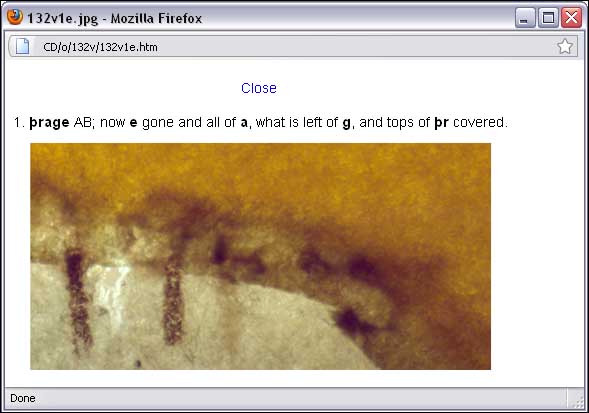
Figure 14. Enlarged Backlits supporting textual notes
In addition to accessing textual notes in this manner from the apparatus embedded in the edition, one may also see on the manuscript page itself the places where special techniques, in particular fiber-optic backlighting, provide images of readings covered by the paper frames of the nineteenth-century restoration binding, or magnify shrunken, damaged letters, or make visible with ultraviolet an erased text. To see the locations of these readings, click the red rectangle on the menu:
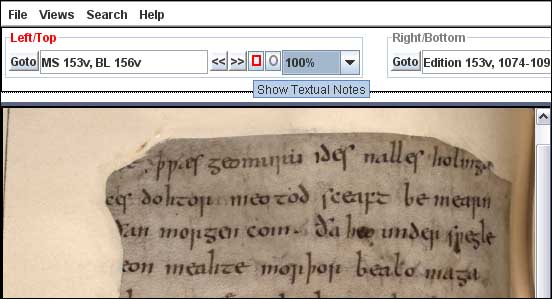
Figure 15. Show Locations of Backlit Images
Click any of the rectangles that appear on the folio to go to the illustrated Textual Notes.
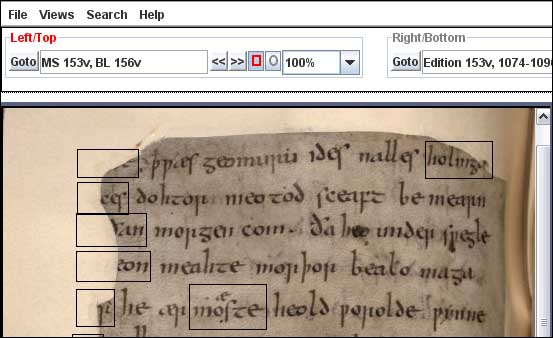
Figure 16. Locations of Backlit Images for Textual Notes
For example, if one clicks on the first rectangle in the upper left, the notes beginning with this backlit image open.
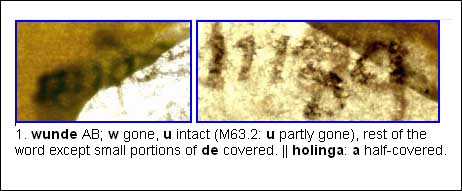
As always, after clicking the small backlit image, the large illustration opens:
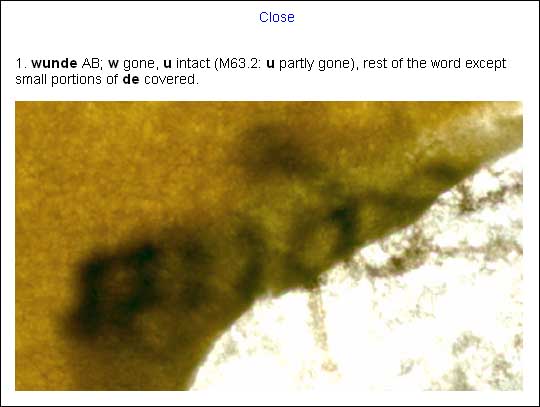
Figures 17-18. Textual Notes from the Folios
Editorial Emendations & Conjectural Restorations
The same quick access to textual notes for Thorkelin restorations applies to editorial emendations and conjectural restorations, which are marked in the critical edition by [italics] within square brackets. The notes themselves identify these readings as either editorial emendations, that is, changes to the manuscript readings, or conjectural restorations, readings that for one reason or another (usually fire damage) were lost to the manuscript. These notes also alert the reader to whether the emendation or restoration is customary to most editions or new to this one.
The new editorial emendations and conjectural restorations are not meant to replace, but rather to supplement or challenge, previous editorial changes that have become ingrained in modern editions. Anglo-Saxon readers of this manuscript did not have access to any modern changes and perhaps devised different solutions each time they encountered problems that demanded emendations. The conjectural restorations are informed guesses that try to fill gaps in paleographically and linguistically plausible ways.
Testing Conjectures
One of the most valuable and perhaps revolutionary aspects of image-based electronic editing of medieval manuscripts is that it permits more accurate evaluation of conjectural restorations of lost text. Before the digital age, conservative editors like Klaeber, who intended to restore damaged readings based on manuscript evidence, printed reconstructions they thought actually fit in the manuscript. Their editions in this respect were meant to conserve the manuscript record. Digital imaging makes it possible for editors to examine the validity of their decisions.
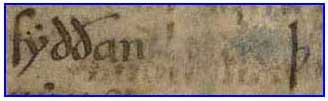
Figure 19. Lost Text in Manuscript
A case in point is the obliterated text between syððan and þ on fol. 179r10. Any attempt at restoration is complicated by the fact that some of the ink traces, as conclusively shown by an overlay in Electronic Beowulf 4.1, come from an offset from the facing fol. 178v. Digital technology allows us to subtract these false leads and arrive at a more plausible restoration.
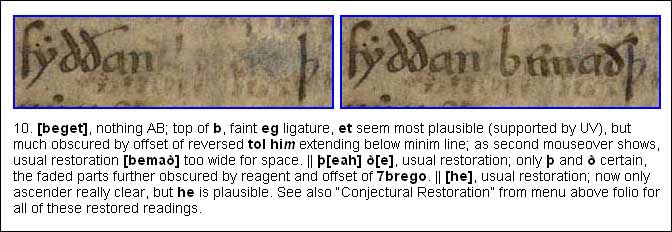
Figure 20. Conjectural restoration that does not fit
The editor of the most recent print edition restores [bemað] in this space with unusual confidence. A digital restoration of bemað using the scribe's own letters from the same page shows, rather surprisingly, that it cannot fit in the space in the manuscript. The extra-wide letters m and ð take up so much room that the cross-stroke of ð ends up crossing the following þ.
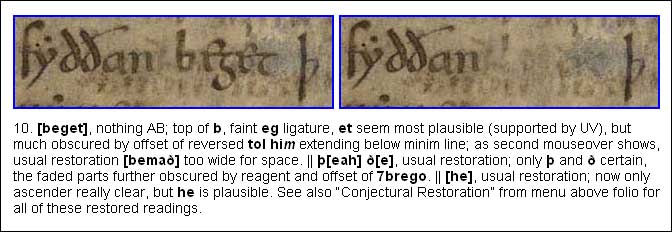
Figure 21. Conjectural restoration that fits
The same method shows that the conjectural restoration [beget], which well suits the context and happily observes everyone's metrical rules, perfectly fits the available space in the manuscript.
In addition to tooltips like these in the textual notes there are also “transparencies” over some key folios, in particular the palimpsest, fol. 179 recto and verso, which allow the reader to study a conjectural restoration in the full context of its folio. The reader is alerted to the existence of one of these otherwise hidden overlays in two ways: (1) the textual note, where applicable, will include the statement, “See 'Conjectural Restoration';” and (2) the O-button on the top menu will be green: 

Figure 22. Conjectural restorations overlaying folios
To gain access to the conjectural restoration in the context of the entire folio the user engages the drop-down menu with the mouse and makes a selection, in this case a choice between a possible and an impossible restoration of the upper-left burnt corner of fol. 180v.

Figure 23. Open Conjectural Restoration
The selection opens an interactive window, which allows the user by means of a slider and other tools to examine the low-resolution conjectural reconstruction. Here the reconstruction shows that a time-honored reading, swiðe ondrædað, is about three letters too wide for the measurable gap; the two undoubted restorations from the pre-fire Thorkelin transcripts in lines 2 and 3 establish the margin, which is also observable and extensible from the bottom of the page.
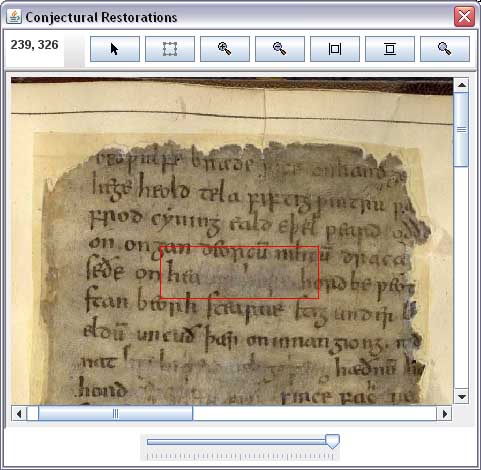
Figure 24. Choosing an area of Interest
Because of its critical importance to the textual history of Beowulf, there are full-page transparencies for the entire palimpsest of fol. 179 recto and verso. Readers may select specific areas of interest, as in this example, or they may view all conjectural reconstructions of each badly damaged page all together, without selecting a particular area.
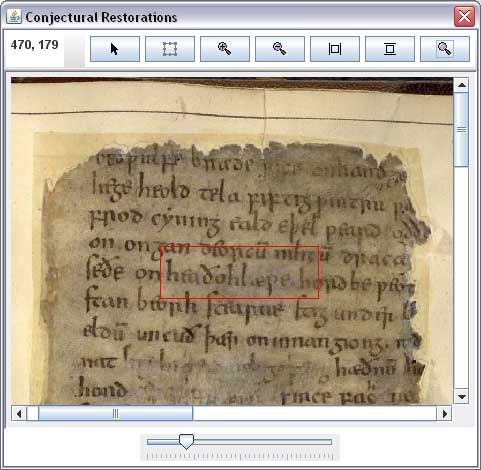
Figure 25. Displaying conjectural restorations
No one, of course, should confuse conjectural restorations, even supported by the scribes' own letters, with the actual manuscript. Electronic Beowulf 4.1 tries to provide an image-based edition that continually leads its readers back to the written evidence from which all our interest in Beowulf ultimately comes.
For the rest of the features of Electronic Beowulf 4.1, most of which were part of earlier versions, consult the comprehensive Help | Online Guide.