Electronic Beowulf
Fifth Edition, © 2026
Kevin Kiernan, editor and designer; Emil Iacob, software engineer
Electronic Beowulf 5.0 is a digital edition of Beowulf closely based on its unique manuscript in British Library MS Cotton Vitellius A xv. The edition provides access to the poem and strategies for studying it in ways unavailable to print editions. The fifth edition allows scholars, students, and general readers, each with different interests and requirements, to customize the edition with ease.
Electronic Beowulf offers much more in imaging and access to primary sources than high-resolution images of Vitellius A xv. In addition to what is visible in the manuscript, ultraviolet images reveal over 130 erased or faded readings as well as the pervasive use of chemical reagents on a critical damaged folio. By digitizing backlighting, over 1300 letters and parts of letters previously concealed by conservation work are now restored. Electronic Beowulf also contains images of all the early transcripts and collations of the manuscript essential for establishing the text.
The program opens with a new top menu that highlights the GUIDE to encourage visitors to learn how to take full opportunity of the program. In addition to the Beowulf manuscript, the high resolution images include the entire composite codex, British Library MS Cotton Vitellius A. xv, comprising the twelfth-century Southwick Codex and the early eleventh-century Nowell Codex that preserves Beowulf.

Clicking the new GUIDE button in the top menu of the Edition opens the comprehensive GUIDE in a new tab. To return to the opening of Electronic Beowulf from the GUIDE, click on the wyrms (dragon heads from The Wonders of the East) in the upper left menu bar.

However, when consulting the GUIDE while working inside the Edition, simply press the open tab for the Edition to return to the same place.
The editon itself is based on the images of its seventy folios. The text is further established, however, by hundreds of partly hidden readings, including 130 ultraviolet images and over 1300 otherwise invisible backlit images revealing letters and parts of letters covered on the versos by nineteenth-century restoration frames.
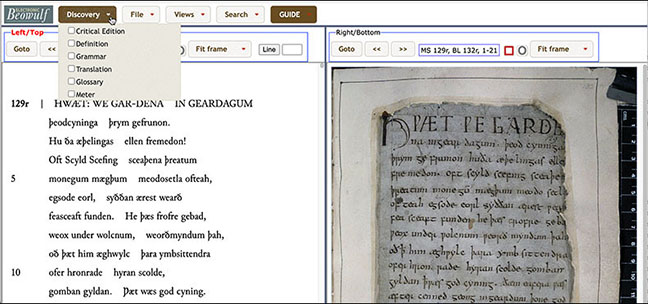
When Electronic Beowulf first opens, the Old English edition is on the left with the manuscript on the right. The editor believes that this configuration with the new Discovery button in the top menu is the best way for everyone to get the most out of the edition. The six options accommodate all levels of users, from research scholars to beginners.
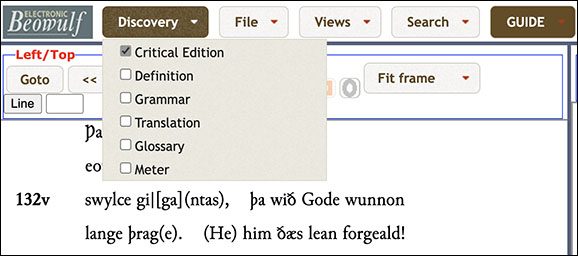
Scholars and advanced students will want to use the Critical Edition, which identifies all restorations and emendations. Clicking any reading in (round) or [square] brackets will open its textual note. There are hundreds of textual notes that disclose by fiber-optic backlighting readings hidden by the paper frames, as well as images of erased words enhanced with ultraviolet.
Undergraduate and graduate students, needing to understand the Grammar and the Meter and still have time in a semester to study and appreciate other important aspects of the poem, have access to tooltips to examine the Definitions and Grammar of specific words or to seek wider knowledge through the entire, exhaustive Glossary.
Advanced students and scholars can use the Critical Edition with its apparatus to identify nearly 2000 eighteenth-century restorations, editorial emendations, and manuscript-based conjectural restorations, and use tooltips to examine the Meter of every half-line in Beowulf, as defined by five different metrists. The fifth edition includes easier access to the Nineteenth-Century Collations, as well as new high-resolution research images of the Madden Collation.
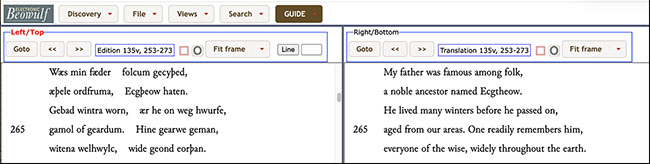
For beginners and general readers who did not know Old English and needed a literal line-by-line Translation, previous editions provided tooltips. This approach remains useful and is accessible by choosing Translation from the Discovery menu. However, the fifth edition now also offers these readers an unpretentious facing Translation meant to emphasize how Old English poetic syntax differs from modern English. When word order appears confusing, the symbol [tr] marks a transposition.
To set up the facing translation, use Views, Change Views, set view options with Translation on the right and Apply.
The edition is revised based closely on and comprehensively illustrated by the single surviving manuscript of Beowulf. Recently contested readings are re-examined and in most cases confirmed by clearer, higher resolution images. The glossary is completely revised, as well, and users now have instant access through tooltips to the definitions and grammar of every one of the 17,327 words in the text. Use the new Discovery button in the top menu to set up any preferences for these modes of discovery.
The Default Setting of the open program has the Edition on the left and the Manuscript on the right. Readers can easily rearrange this view to suit their own preferences, although the Default setting is best for searches.
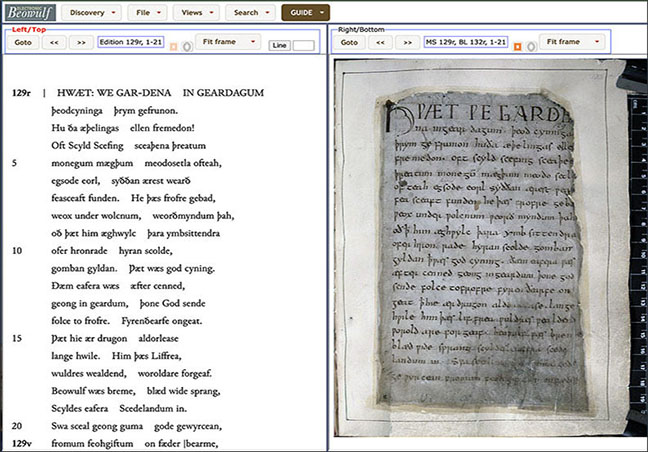
The easiest way to start is simply to proceed through the manuscript using the Next  and Previous
  navigation buttons on the top menu. Use the Goto button on the menu to choose a specific folio, and text and image of that folio will open together. You may increase or decrease the size of the image at the Fit Frame panel. Other uses of the top menus are discussed in the exhaustive GUIDE.

For up-to-date detailed instructions to all aspects of Electronic Beowulf, remember to click the new GUIDE button.
Discovery
The fifth edition of Electronic Beowulf contains many tools designed to discover a very wide range of information that is normally difficult or tedious to consult: definitions, detailed parsing (including help with strong verbs), literal translations, an exhaustive glossary, lexical cross-referencing, metrical analyses of five metrists for all verses, a critical apparatus, textual and explanatory notes, eighteenth-century restorations, editorial emendations, conjectural restorations, and ease of reference to manuscript images as well as to printed editions.
Discovery Modes
To help the user take easy advantage of these resources, the new Discovery button in the top menu of Electronic Beowulf opens a menu of choices, described and illustrated in the GUIDE below. Click any or all of the choices to activate them within the edition. Click any or all choices to deactivate them.
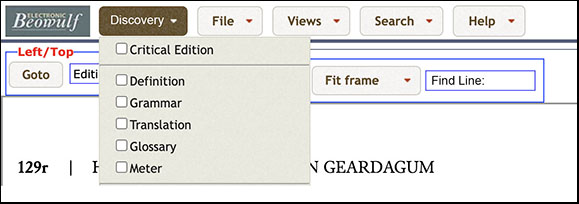
Critical Edition
Choosing Critical Edition from the new Discovery in the top menu of Electronic Beowulf 5.0 opens many ways to access the manuscript evidence. This choice releases the editorial markup identifying Thorkelin restorations, as well as editorial emendations and conjectural restorations.
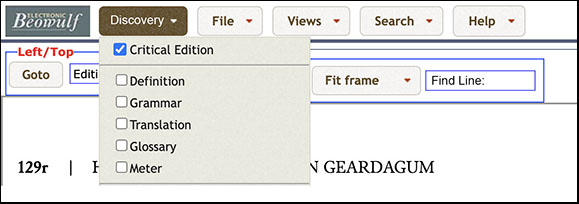
For an expansive explanation of this Discovery Mode, click Critical Edition in the menu at the top of this page.
Translation
A general reader may simply want to enable the interlinear translation by selecting the Translation option. Thereafter a literal translation of any line will appear whenever the mouse is held over that line. The translation strives to observe the word order of the Old English, but the symbol [tr] appears where transposing phrases seems necessary. The translation is purely utilitarian, aiming to serve as a useful “trot” for unraveling the syntax for beginners and casual readers. It should also eliminate misunderstandings about how the edition interprets the text through its glossary.
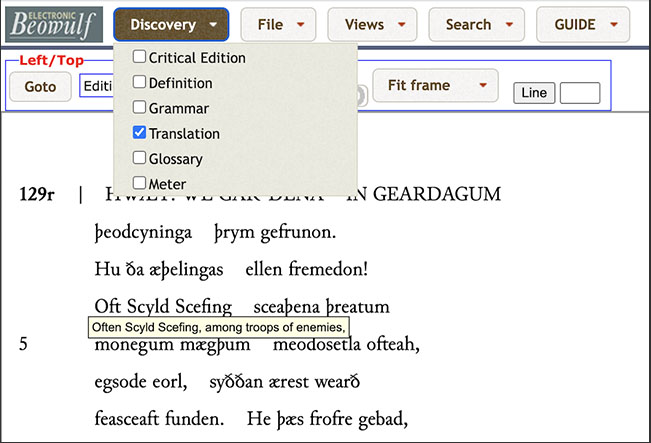
Definition & Grammar
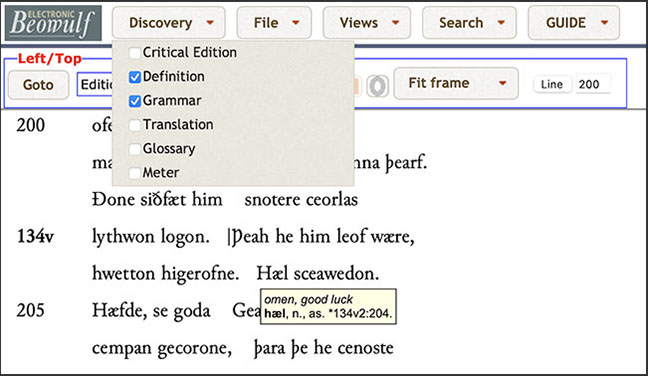
A student will want more information about individual words, and probably prefer not to have the translation intrude on this level of study. In this case the student can remove the check mark beside Translation and check instead the button for Definition or for Grammar, or for both. If both are chosen, a definition and abbreviated morphological information will appear when the mouse is placed over any word in Beowulf.
Glossary
The Grammar tooltip reveals that onfeng is third person singular, past tense indicative, of the verb, onfon, a class 7 strong verb. A student might well want to investigate this verb and its class. By double-clicking the word onfeng in the text or by selecting the button for Glossary, the student can open the full entry for onfon in the context of a comprehensive glossary of Beowulf.
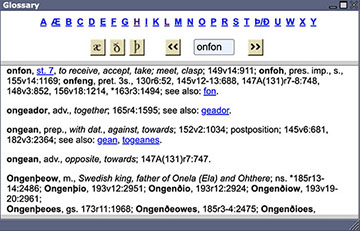
The student will see from the cross-reference with fon that on- is a prefix, and by following the link to the base word will find that Beowulf uses six different verbs formed by prefixes with fon (befon, onfon, ðurhfon, wiðfon, ymbefon, and gefon). One can explore all of these related words and easily return to onfon and onfeng and the edition by following the links.
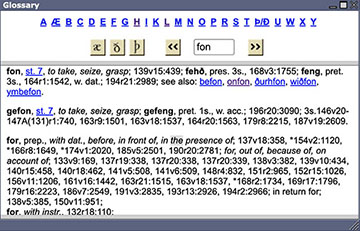
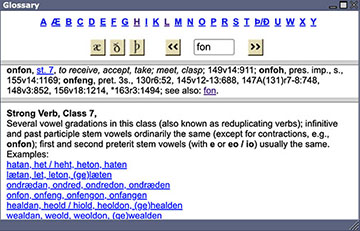
The verb gefon, class 7 strong, has an unusual infinitive form, a contraction. To understand its conjugation in the context of other strong class 7 verbs, one can click the class number to divide the Glossary window to provide other models of that class. To close the lower window, place the mouse on the divider and pull it down like a window shade.
The full Glossary provides a wealth of information for casual readers, serious students, and scholars. By clicking any location, which for easy reference to the manuscript always provides folio, folio line, and verse line, take the reader directly to that location in the text. To keep the full Glossary handy but out of the way, shrink the window:

Meter
Students may also wish to study the meter of Beowulf. Electronic Beowulf 5.0 provides comprehensive access to the scansion of all half-lines in the poem. By clicking the Meter option, the student may choose to have tooltips for any or all of the five different prevailing metrical systems.
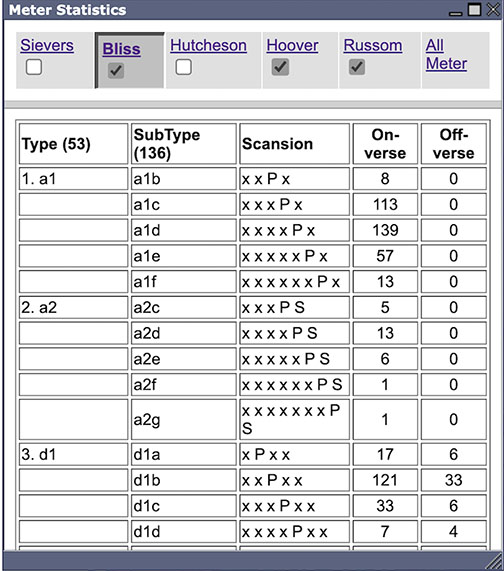
Some metrists have highly empirical, untheoretical approaches with scores and even hundreds of types, while others have elegant abstract theories with relatively few types. Students will find that even the more abstract theories often display very different interpretations of the meter of individual lines.
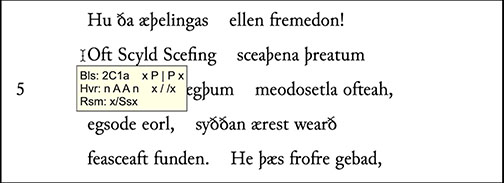
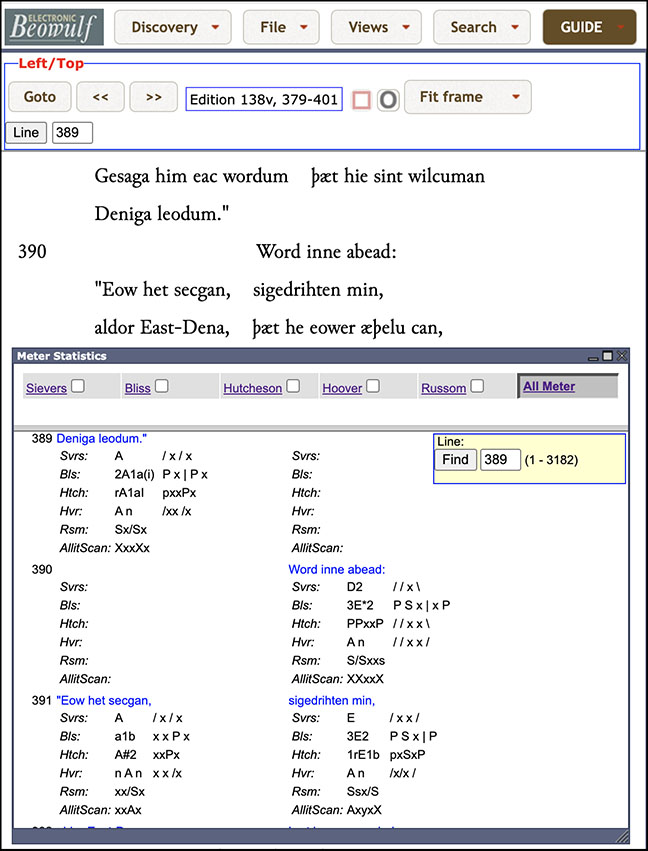
Using the tooltips, readers will also learn to what extent different metrical theories invisibly emend a great multitude of manuscript readings by suppressing or adding syllables in their scansions. If they do not want to show metrical tooltips, students and scholars can still study all the statistics of each metrist in their respective lists or open the searchable “All Meter” window for comparative views of any or all lines.
Traditional Line Numbers
Electronic Beowulf 5.0 has reverted to traditional line numbers to facilitate its use with the printed editions. Previous versions of Electronic Beowulf showed 1384 lines, rather than the traditional 1382, to draw attention to manuscript problems (single half-lines, hypermetrical lines, apparent gaps, and other anomalies). These issues are now addressed in the Textual Notes.